Tuesday, 1 June 2021

What's happened to Hue-topia?


The Hue-topia Mac app goes back to November 2013. To be frank, it has been in a vicious cycle of very little interest / therefore very few updates, and has not kept up with changes from Philips such as additions to their API and dropping of support for the v1 (round) bridge.

From the start, Hue-topia had its own interface concepts which it shared with LIFXstyle. These didn't always align with the concepts of the Hue system. Therefore HT was doing a lot of conversion / bridging. This led to a lot of unnecessary complexity and inconsistency within the app,

Hue-topia version 4 is a new version for 2021 and way more of an overhaul than it may appear from the interface.  It is intended to be more of an interface with your bridge, and have concepts which align with the Hue system.


Key changes include:

  • Presets are now Scenes. The scenes list is a nice way to control your lights (click to select a scene appropriate for the mood or time of day, using manual controls for creating those scenes). HT4 allows you to add your own photograph / icon to represent a scene.
  • Uses newer additions to Philips' API, such as 'localtime' rather than 'time'. These changes tend to make HT less complex and more likely to work as expected.
  • Sunrise and Sunset functionality used to be managed pretty heavily by HT. It calculated times using your location, allowed you to select from the various definitions of sunset/sunrise, and could regularly update scheduled times on the bridge accordingly. Now the Hue Bridge has its own daylight functionality with configurable offsets and it's more appropriate to make use of that. (not yet implemented in the v4 beta).
  • Support for sensors. The motion sensor, besides detecting motion and having a little configurability, also has a temperature sensor which can be viewed in HT4.
  • Effects and the effects designer are no longer a feature of Hue-topia. We feel it's more appropriate for this functionality to form a separate app, which we'll do if people ask.
Version 4 is just about ready for beta. ie most of the functionality (that's intended for v4.0) is there but is in the testing / fixing stage. It'll be freely available for public testing very shortly. 

Tuesday, 25 May 2021

Loading files onto RC2014 from Mac


Background: the RC2014 is a Z80-based homebrew computer. I love programming 8-bit computers in Forth, Assembly, sometimes even BASIC.

The ROM I use allows me to select basic/monitor/cpm at startup, I almost always use CP/M. There's a CF card there in the middle of the computer.

Getting files onto that card is the issue. My computer won't read that card natively. There are tools for mounting the card, and for sending a file to the RC2014 via the terminal but I've not been able to get anything working on my Mac yet.

The methods that I've used from the start involve pasting an IHX file in using Hexload or SCM, which load the file into the computer's memory, or a PKG file together with the DOWNLOAD utility which stores the file in the current drive on the CF card.

This requires an easy way to convert the source file to IHX or PKG. Fortunately this isn't too difficult. Those formats just encode the data as hex characters (along with some checksumming / formatting etc).

Here's my little utility. The Open button allows you to choose your source file via a file browser. 

When I develop for the RC2014, I'm obviously changing my source file frequently (ie my built binary, .COM or .BIN, or as here, a forth source with extension .F) so the reload button allows me to simply reload the same file with a single click.

In these screenshots, I'm choosing to convert to PKG, which begins with the DOWNLOAD instruction. It's obviously important to have DOWNLOAD in A: on your storage device (This may not work with RC2014 ZED computers). The button labelled 'Out Ext' simply chooses the extension that the file will have when saved. (When I build assembly source, it ends up with .bin extension, but I need it to be .COM when transferred over to the RC2014).

So having chosen the right options and 'Open'ed the file, the converted file is displayed in a text field ready to be copied and pasted. For pasting over to the RC2014, make sure that the terminal is set to make a small delay between characters (as always when pasting). And switch to the drive where you want to save the file. Here's that file being 'pasted' into my F: drive on the RC2014:

Here's the same file, with IHX chosen as the conversion format. This type of file is suitable for loading directly into memory using the Hexload utility on the RC2014, or the SCM (small computer monitor).
This time the 'Start' memory address comes into play. With CP/M this will always be $100. 

My utility is not very polished, as is the way with things that you make for yourself. But if this will help you, I've signed and notarized it and you can download it here. It's built to run on MacOS 10.14 upwards. 

Let me know if this is useful to you, or if you have any comments / suggestions.

shiela@peacockmedia.software  or leave a comment below.


Tuesday, 23 March 2021

Mac graphic user interface (GUI) application for TL866 programmer (minipro wrapper)

I can't believe that no-one has done this already but as far as I can see, we Mac users have to use the command-line when using our TL866 programmers.

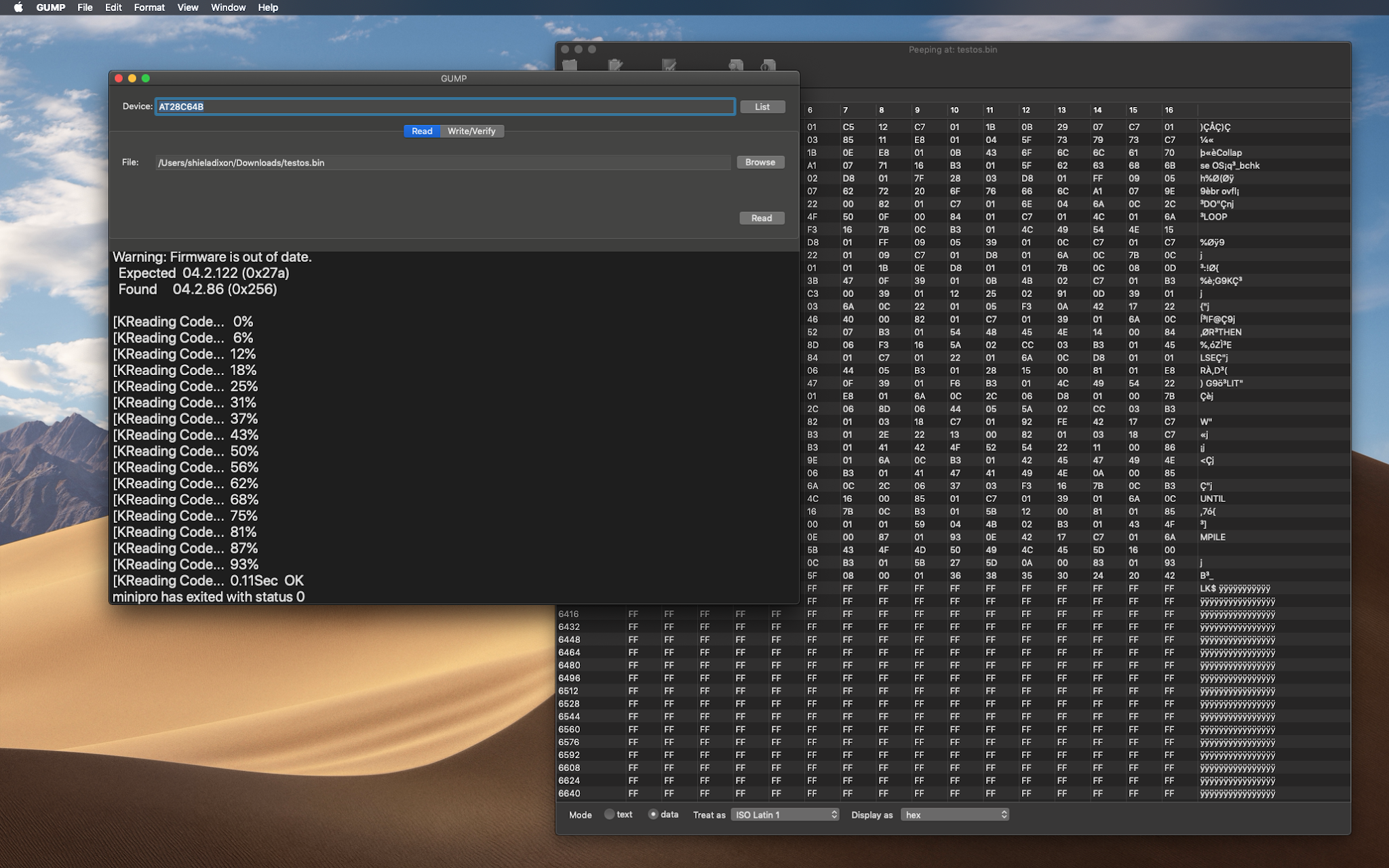
That's absolutely fine; the man page exists, is short and easy to understand.  Purely to save myself from trying to remember what options I need to use, or last used*,  I've built GUMP (Graphic User-interface for MiniPro) which is just a wrapper for the minipro command**


It's pretty basic and a bit clunky, it just allows Read (save contents to file), Write and Verify with a few checkboxes for some of the minipro options. 

In time, I'll add anything that I will personally find useful and maybe build a 'hexedit' viewer into this app (in the screenshot it's my hexedit-style app Peep which is displaying the contents of the ROM, as saved to a file by GUMP.)

I'm throwing this out there so that if anyone else is interested in having this, I'll tidy it up a bit and make it publicly available. (Comment below or contact me using the usual channels.)


* or having to type the string somewhere and then trying to remember where I saved it

** which you need to install separately. However, if you already have homebrew, this is as simple as: 

brew install minipro

Monday, 22 March 2021

Review of Hue motion sensors and possible Integration into Hue-topia for Mac

I first made Hue-topia and LIFXstyle some years ago after becoming very paranoid (justifiably) about intruders. 

At the time, no sensors existed for the system (at least as consumer products - Philips went with the zigbee network system, which in theory means that there were other third-party products that would work). I experimented with sound and motion detection using EyeSpy cameras, which worked. The security aspects of Hue-topia and LIFXstyle were the reason for the dragon icon (someone asked this question recently).


Both Philips and LIFX added products to their range - more bulbs, switches, sensors. I had to purchase any products I wanted to support, which would have cost more than the revenue from the apps. For this reason I stuck to supporting only the lights in my apps.

This is the reason that I'm very late to the party with the motion sensor, and I have to be honest, wanting an outside temperature reading is the main reason I went for one. 

Yes, each Philips motion sensor, despite the name, also contains a thermometer and possibly daylight sensor (though I've a feeling this may be calculated by the bridge and not a sensor, but I can't go back in time and check whether this pre-existed my first motion sensor).

Anyhow. Thanks to Philips' open API and REST interface, it's very simple to read these sensor values. As you can see in the first screenshot I've added a little functionality to Hue-topia (in my development version thus far). I can now see the outside temperature* from the status bar of any of my computers/laptops.

I have to say that adding my first motion sensor to my network was a breeze. A magnetic mount makes it very easy to put up (and take down to change the battery). It's a tiny thing, which makes it discreet. It's battery-powered which was important to me. The last thing you need is another thing to plug into a socket.  Having to route wires is a pain and restricts where you can place it.   When I pulled the tab to connect the battery it started to flash, which seemed to indicate that it was searching.  I chose 'Discover' in Hue-topia and the flashing stopped. It was then working on the network without me even having to walk to the bridge and press a button. I obviously have yet to discover how long the batteries (2xAAA I think) last. 

Traditionally and personally I've leaned towards the LIFX system; the bulbs were brighter and did more colours*. I have to say that, many years on and many bulbs later, I own more broken LIFX bulbs than Hue bulbs (3:1). As well as this apparent better reliability, the Hue bridge is a good thing. Yes, it's an extra product to buy and give space (and a power socket) to. LIFX use 'bridgeless' as a selling point. But the Hue bridge does have a lot of functionality and is always on, more reliable and maintenance-free than my 'always on' mac. After moving house, the Hue bulbs have been easier to get working again than my LIFX bulbs and strips.

In short I'm warming to the Hue system and I'm liking the motion sensors a lot. My rule for switching the porch light on when motion is detected is working really well*. Its sensitivity seems just right, it seems to talk to the bridge reliably even though they are at opposite ends of the house and the sensor is outside (I seem to remember that the hue/zigbee system is a mesh, so the bulbs themselves may be serving as relays). 

At this point I'm not sure how much of the 'rule' functionality I'm going to build into Hue-topia. Philips seem to have the 'formula' system sewn up into their mobile app. I've been using the built-in debug tool to add and edit my own rules (because I don't personally like cloud-based systems). Once they're set up, they're set up and it'll probably be only groups and scenes that I need to edit, so I suspect that building a 'rule builder' into HT would be a lot of work which would be of interest to very few people. Tell me if I'm wrong. 

I may well release a little update that puts any temperatures detected into the status bar menu.


* I have read that this may be a degree or two out (I don't have a reliable thermometer here to calibrate mine) but it's a very simple matter to adjust this in software. I'll probably add a box in Preferences so that the user can enter "-1.2" or whatever

*I think some of the 'friends of hue' range did the full range of colours, but in the early days, the domestic-style Hue bulbs had a limited colour space. Green was weak and blue almost non-existent. I haven't tried more recently-produced bulbs. To be objective, I probably only sweep the colour range when showing off to friends and family. Other than Halloween parties or effects lighting, I can't see a use for a strong green or strong blue. In normal use I find that I like to use the Hue colour bulbs in 'white' mode, which gives you a spectrum from cold to very warm. That's all you really need in a domestic setting.

*switching off after a period of being on is not.  I suspect that this may be because the porch light illuminates an area that can be seen by the sensor (which is part of the point) and so switching it off may be triggering it to come on again. I need to experiment more with this.

Friday, 19 March 2021

Album art lookup using MusicBrainz - experimental free app

ScreenSleeves generally receives the album cover  art from whatever music player you're using (Spotify, Apple Music, iTunes and many others).

There are cases where it doesn't. For example when listening to an internet radio stream using certain apps, often only the artist and track name are provided. 

ScreenSleeves has traditionally had the option to look up album art online where necessary. (In fact, it had the option to *always* look up art online when using Snowtape, because the method SS used was more likely to produce the correct art than Snowtape itself.)

ScreensSleeves has used Gracenote for a few years. GN is a firmly commercial operation but they allowed me (with the actual number of requests capped) to use the service for free.  At some point recently that lookup service seems to have unceremoniously stopped. My account doesn't exist any more and there's no longer any information about the lookup / API. (Often the way when you make use of 3rd-party services.) A quick Google shows that software and even hardware that made use of CDDB for CD information no longer works since a certain date. 

MusicBrainz is a much more open music database. They allow free non-commercial use. I have discussed Screensleeves with them and come to an arrangement which allows SS to perform the necessary lookups when necessary. 

This is a good solution. I have some old and obscure albums that it doesn't have artwork for, and even the odd album that it doesn't even have in the database (I must learn how to contribute to the database). However, the search works beautifully and when the artwork is available it's very good quality. 

With this up and running in the development version of Screensleeves,  I was impressed with the quality of the artwork and wanted a way to simply perform a lookup and save the cover for my own use in iTunes.  (My personal media server uses an old version of MacOS and iTunes, because when something works I like it to remain the way it is, rather than changing at the whim of the maker.)

I've built an interface around the MusicBrainz cover art lookup that I'd written for ScreenSleeves and this is the result. 


The download is here (well done for finding it. At this point I won't publish it on the peacockmedia.software main site or anywhere else). 

If this interests you, please let me know in the comments or by email. Other apps are available but they do tend to integrate with your iTunes/Music library rather than simply allowing you to save the artwork and do what you like with it.


Friday, 5 February 2021

HTML validation of an entire website

Version 10 of Scrutiny and Integrity Pro contain  built-in html validation. This means that they can make some important checks on every page as they crawl. 

It's enabled by default but can be switched off (with very large sites it can be useful to switch off features that you don't need at the time, for reasons of speed or resources).


Simply scan the site as normal. When it's finished, the task selection screen contains "Warnings: HTML validation and other warnings >"
(NB Integrity Pro differs here, it doesn't have the task selection screen above, but a 'Warnings' tab in its main tabbed view.)

Warnings can be filtered, sorted and exported. If there's a type of warning that you don't need to deal with right now, you can "hide warnings like this" temporarily or until the next scan. (Right-click or ctrl-click for context menus.)


The description of the warning contains a line number and/or url where appropriate / possible.

In addition, links are coloured orange (by default) in the link-check results tables if there are warnings. Traditionally, orange meant a redirection, and it still does, but other warnings now colour that link orange. A double-click opens the link inspector and the warnings tab shows any reason(s) for the orange colouring.  Note that while the link inspector is concerned with the link url, many of these warnings will apply to the target page of the link url.


The full list of potential warnings (to date) is at the end of this post. We're unsure whether this list will ever be as comprehensive as the w3c validator, and unsure whether it should be.  At present it concentrates on many common and important mistakes; the ones that have consequences.

Should you wish to run a single page through the w3c validator,  that option still exists in the context menu of the SEO table (the one table that lists all of your pages.  The sitemap table excludes certain pages for good reasons.)


Full list of possible html validation warnings (so far):

unclosed div, p, form
extra closing div, p, form
extra closing a
p within h1/h2...h6
h1/h2...h6 within p
more than one doctype / body
no doctype / html / body /
no closing body / html
unterminated / nested link tag 
script tag left unclosed
comment left unclosed
end p with open span
block level element XXX cannot be within inline element XXX  (currently limited to div/footer/header/nav/p  within a/script/span  but will be expanded to recognise more elements )
'=' within unquoted src or href url
link url has mismatched or missing end quotes
image without alt text. (This is an accessibility, html validation and SEO issue. The full list of images without alt text can also be found in Scrutiny's SEO results.)
more than one canonical
more than one opening html tag
Badly nested <form> and <div>
Form element can't be nested
hanging comma at end of src list (w3 validator reports this as "empty image-candidate string")
more than one meta description is found in the head

warnings that are not html validation:

Type mismatch: Type attribute in html is xxx/yyy, content-type given in server response is aaa/bbb
The server has returned 429 and asked us to retry after a delay of x seconds
a link contains an anchor which hasn't been found on the target page
The page's canonical url is disallowed by robots.txt
link url is disallowed by robots.txt
The link url is a relative link with too many '../' which technically takes the url above the root domain.
(if 'flag blacklisted' option switched on) The link url is blacklisted by a blacklist / whitelist rule. (default is off)   With this option on, the link is coloured red in the link views, even if warnings are totally disabled.


Tuesday, 22 December 2020

A sneaky peek at what's coming in early 2021

Scrutiny and Integrity have received constant attention and frequent updates (often weekly). 

But they feel like mature applications. They sell well, are well-used, we use them to provide services and yet reported problems are very few.

Requested features / functionality have been few too and we haven't had anything major on the radar for these apps. 

However, if you've followed recent developments you'll know that the 'warnings' functionality has been progressing. 

Traditionally, links are coloured orange if there's a redirection. The redirection itself is certainly not an error and users may or may not be concerned about them. (So warnings about redirections can be switched off.)

For some time, other things have been noted and reported as 'warnings' (and listed separately from the redirections in the link inspector) and people asked for a way to view / export these warnings. Scrutiny has been gaining new ways to view warnings (eg columns in tables, a tab in the link inspector). More recently warnings (again, distinct from redirections) have been presented in their own table.

This in itself is major new functionality. It has happened incrementally in later minor releases of version 9.  Version 10 marks what has so far been more of an evolution.

It can go much further. Way back, Scrutiny had the ability to pass every page that it scanned to the w3 validator. Although it was a little clunky internally, it was a very popular feature, and therefore frustrating when w3.org released the 'nu' validator which didn't have the API that allowed us to use it in the same way as before.

Because of the way that our crawling / parsing  engine works, it's easy to spot and report a few more html validation problems. We're working hard on this now. When the v10 beta is released after the new year, it will be able to report a number of important validation problems. It won't be a full html validator just yet, but the list of problems that it can report will grow through 2021.

The html validation functionality applies to Scrutiny and Integrity Pro only.

Scrutiny version 10 will be a free upgrade from the current version, although the word is that there may be a small price increase for 2021. (hint: if you're thinking about buying, now is a good time.) 

[update 8 Jan 2021] The first public beta of v10 is available for download. Important: It will be a free upgrade. It will ask for a key. If you already have a key it will accept your existing one. Just get in touch if you get a 'too many activations' message, the key just needs resetting.

[update 29 Aug 2021] Version 10 has been through some minor point updates and is stable. The warnings functionality continues to gain new warnings and be improved. 


~ Shiela