Showing posts with label link checker. Show all posts

Wednesday, 16 February 2022

In simple terms, the best settings for Integrity and Scrutiny

The default settings for Integrity, Integrity Plus, Integrity Pro and Scrutiny have been tweaked over 15 years. Generally speaking, they will be the best settings and the most likely* to perform a successful, full  and useful scan.

The very short version of this post is: go with the defaults, and only adjust them if you understand and want to use an additional feature, or if you have a problem that may be cured by making a change. Please contact support if you're unsure about anything. 
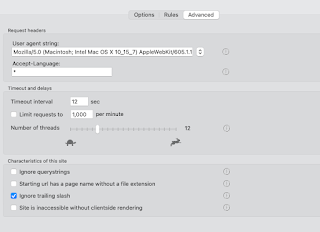

The rest of this post gives a very basic 'layman' explanation of the site-specific options and settings. 

In version 12 (in beta as I write this) these settings have been rearranged and grouped into a more logical order. They're listed below as they are grouped in version 12.


Options

These are optional features. In general, only enable them (or change the default) if you understand what they mean and are prepared to troubleshoot if the option causes unexpected results.


  • This page only:  Simple - sometimes you may want to scan a single page. If you want to scan an entire site, leave this switched off.
  • Check linked js and css files:  This will drill more deeply into the site. If you're looking for a straightforward link check, leave this off.
  • Check for broken images:  Finding broken images is probably as important as finding broken links, leave this on
  • Check lazyload images/load images:  It's possible that your site uses lazyloading of images. If you know that it does then you may want to enable this. NB there is no standard for lazyloading images. Integrity will try to find the image urls in a couple of likely places, but this option can lead to false positives or duplication. Be prepared for troubleshooting.
  • Check anchors:  An anchor link takes you, not just to a page, but to a specific point on a page. With this option on, Integrity will check that the anchor point exists on the target page. If you know that your site uses this type of link, and you want to test them, enable this option.
  • Flag missing link url:  Sometimes during development, you'll create links with empty targets, or use # as a placeholder. This is a way to find those 'unfinished' links.


Advanced

Here we have the controls that may sometimes need to be altered to 'tune' Integrity to your site. In general, the default values should work, only change them if you have a reason.


  • User-agent string:  The default values should work almost all of the time. If the user-agent string is how Integrity identifies itself. If this is set to that of a real browser (which is now the default value) then that should be fine. (Occasionally a site will give different pages for a mobile browser / desktop browser. Or to Googlebot.) 
  • Accept language:  can be used to check specific language pages of a multilingual site.
  • Timeouts and delays:  Use the defaults. If you have problems with timeouts or certain errors then it may be necessary to adjust these settings.


Site characteristics 

Here are a few settings which may need to be adjusted for your particular site. Again, the defaults should be fine, but refer to this guide or ask for help if you have problems.


  • Ignore querystrings: This is the option that is most likely to need changing to suit your particular site. The default is off and that'll probably be fine. However sometimes a session id or other things can be included in the querystring (the part after the ? in a url.) and sometimes these can cause loops or duplications. In that case the setting should be on.  On the flip side, sometimes important information can be included in the querystring, such as a page id, and so for those sites you definitely need the setting to be off.
  • Page urls have no file extension (more recently renamed 'Starting url has page name without file extension'): The explanation of what this box actually does is lengthy and it's more than likely that you don't need it switched on.  In the case where it's required, Integrity should recognise this and ask you an explicit question, and set this box accordingly.
  • Ignore trailing slash: It's very unlikely that this needs to be switched off (default is on). It has become less important in version 12 because its inner workings are slightly different.


If you're using version 10 or earlier, then you'll have the option to Check links on error pages.  I strongly advise leaving this switched off, as it's pretty likely to cause problems or confusion. v12 doesn't have the option. 

If you have a custom error page (which is likely to be one page) and want to test the links on it, then test it separately by setting up a single-page configuration to a non-existent url (such as mysite.com/xyzabc) 


Rules

If you have a specific problem, then you can sometimes cure that with a targeted 'ignore' or 'don't check' rule.  

The other very useful use for rules is to either ignore an entire section of a site, or to limit the crawl to a specific part of a site.


*It may not seem that way if yours is one of the sites that needs a change from default settings, but that's probability for you.  In practice, only the querystring setting is an unpredictable 'it depends' setting. Go with the default, contact support if you need help.

Monday, 31 January 2022

Locate : an overlooked feature in Integrity and Scrutiny

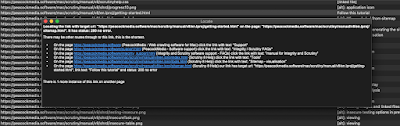
 The Locate feature is an overlooked feature in Integrity and Scrutiny. It answers the common question, "Integrity is reporting a broken link on a page but I don't know where to find that page" or "that page shouldn't exist any more".

It tells you, as a user, how to find the link in question and the page it's on. These hyperlinks are clickable.


There may be more than one route to click through from the home page (or your starting url) to the link in question, but this tool should show the shortest.

It's important to distinguish here between link urls, and a single instance of a link.

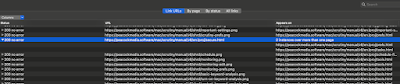
In this example, I've selected a link url which has tested as good. There may be links with that target url on multiple pages (or multiple links on the same page). For example a link to the home page probably exists on every page of a site, maybe in more than one place on a page.


A context menu* triggered by a right-click or control-click on that url row will only show options that are relevant to that url, or the page at that url. In order to access the Locate feature, you need to right-click one of the link instances, which are revealed when you expand the row.

The By page and By status views both show link instances when the page / status is expanded, so Locate can be accessed in those views after expanding a page/status. All Links is a flat table showing link instances, so Locate will appear when you right-click any row. In all of these cases it's important to only select a single row, Locate can't work on multiple selected items.

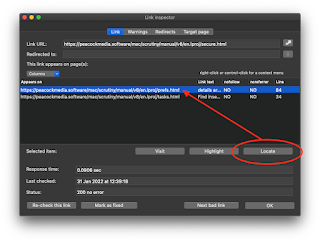
Similarly, if you open the link inspector, it concerns a link url and the status of that url when tested, and it has a table listing the instances or occurrences of that url in links. Before using the Locate button (or context menu in that table) it's important to select one of the instances in the table.


Recent versions of Integrity and Scrutiny may have Locate in these context menus but it may not appear to do anything. This is fixed in Integrity and Scrutiny v10.4.12+


Tuesday, 21 September 2021

First look at new app LinkDoc (for testing links within locally-stored pdf or docx documents)

One of the most frequently-asked questions on the Integrity support desk is how to test the links within a local document (.pdf or .doc). It should be possible with Scrutiny, it can parse a pdf or doc but only when Scrutiny encounters it as part of a website crawl.

Rather than shoehorn the functionality into the existing apps, this sounds more like a job for a 'single button' app built for this one purpose. Here it is.


It happens that I'm well into a ground-up rewrite of the Integrity / Scrutiny crawling engine. It's at the point where it runs. There's plenty to do, but for parsing a single page (document in this case) and checking the links, it should be fine. Of course as the 'V12 engine' develops, then any apps that use it, such as the new LinkDoc will receive those updates.


If you'd like to try it, it's available for download now. It's free but in return, please contact us with any problems or suggestions.

Thursday, 9 September 2021

429 status codes when crawling sites


I've had a few conversations with friends about Maplin recently. I have very good memories of the Maplin catalogue way back when they sold electronic components. The catalogue grew bigger each year and featured great spaceship artwork on the cover. They opened high street shops, started selling toys and then closed their shops.

The challenge with this site is that it would finish early after receiving a bunch of 429 status codes. 

This code means "too many requests". So the server would respond normally for a while before deciding not to co-operate any more. When this happens, it's usually solved by throttling the crawler; limiting its number of threads, or imposing a limit on the number of requests per minute.

With Maplin I went back to a single thread and just 50 requests per minute (less than one per second) and even at this pedestrian speed, the behaviour was the same. So I guess that it's set to allow a certain number of requests from a given IP address within a certain time. It didn't block my IP and so after a break would respond again. 

I managed to get through the site using a technique which is a bit of a hack but works. It's the "Pause and Continue" technique. When you start to receive errors, pausing and waiting for a while allows us to continue and make a fresh start with the server. A useful feature of Integrity and Scrutiny's engine is that on Continue, it doesn't just continue from where it left off. It will start at the top of its list, ignore the good statuses but re-check any bad links. This leads to the fun spectacle of the number of bad links counting backwards!


On finish, there seems to be around 50 genuinely broken links. Easily fixed once found.


Monday, 6 April 2020

Checking your browser's bookmarks

I had not considered this until someone recently asked about using Integrity to do the job.


Yes, in principle you can export your bookmarks from Safari or Firefox as a .html file and ask Integrity, Integrity Plus, Pro and Scrutiny to check all of the links it contains.

The only issue is that the free Integrity, and App Store versions of Integrity Plus and Integrity Pro are 'sandboxed', meaning that for security reasons, they generally only have access to local files within their own 'container'. Apple insists on this measure for apps distributed via their App Store.

For this reason, those versions of those apps will not be able to fully crawl a website stored locally (some people like to do this, although there are some advantages if you crawl via a web server, even via the apache server included with MacOS).

However, here we're only talking about parsing a single html file for links, and testing those.

A sandboxed app can access any file that you have chosen via an open or save dialog.

So all you need to do is to use File > Open to choose your bookmarks.html file rather than typing its name or dragging it to the starting url field. (Remember 'check this page only' to ensure that you only check the links on the bookmarks file and the app doesn't try to follow all of them.)
I have bookmarks in Safari going back many years. (nearly 2,000 apparently) There are so many pages there I'd forgotten about and some that clearly no longer exist or have moved.

Thursday, 2 February 2017

Scrutiny 7 launched! 50% deal via MacUpdate

After many months in development and more in testing, Scrutiny v7 is now available.


Scrutiny builds on the link tester Integrity. As well as the crawling and link-checking functionality it also handles:

  • SEO - loads of data about each page
  • Sitemap - generate and ftp your XML sitemap (broken into parts with a sitemap index for larger sites)
  • Spelling and grammar check
  • Site search with many parameters including multiple search terms and  'pages that don't contain'
  • Many advanced features such as authentication, cookies, javascript.


The main new features of version 7 are:

  • Multiple windows - have as many windows open as you like to run concurrent scans, view data, configure sites, all at once
  • New UI, includes breadcrumb widget for good indication of where you are, and switching to other screens
  • Organise your sites into folders if you choose
  • Autosave saves data for every scan, giving you easy access to results for any site you've scanned
  • Better reporting - summary report looks nicer, full report consists of the summary report plus all the data as CSV's
  • Many more new features and enhancements

MacUpdate are currently running a 50% discount. [update, now finished, but look out for more]

Note that there's an upgrade path for users of v5 and v6 with a small fee ($20). You can use this form for the upgrade.

Sunday, 30 October 2016

A sneak peek at some of the new features of Scrutiny v7

Scrutiny v7 is still very much in progress and being shaped, but here's a sneak preview, in case you'd like to feed back or make suggestions.

I demonstrate in the video:

 - document based (multiple windows open at once)
 - organise your websites into folders
 - simpler navigation
 - full autosave (view data for any site you've scanned previously)


[update] Version 7 is now well-established and has proved very popular. It's available here, and details about the very reasonable upgrade are also on the page.
http://peacockmedia.software/mac/scrutiny/

SaveSave

Friday, 2 September 2016

Scrutiny v7 - closer!

The new version of Scrutiny for MacOS has now made it off the scraps of paper and as far as a working prototype (as far as the UI is concerned, which is where the major changes are).

The new features are:

  • Organise your sites into folders, with drag and drop to move them around (above)
  • Next and Previous buttons are gone; navigate by simply clicking what you want 
  • A new breadcrumb widget (top-left in the screenshots) allows you to navigate as well as giving a sense of location
  • The growing list of site-specific settings are organised into tabs. These had become so disorganised and ugly with at least two dialogs (advanced and schedules) accessed via buttons
  • Scrutiny becomes document based meaning as many windows open as you like showing different sites (just cmd-N or File-New to open a new window). Make multiple simultaneous scans
  • This also makes better handling of data, with windows remembering their state and their data (if autosave switched on)
  • Improved flow - From the summary / settings screen choose to make a new scan, view existing data (if available) or load data. Only after the scan do you choose which results you want to view. 


There will be few changes to the link checking, SEO check, sitemap and other functionality.

If you would like to have a click around this prototype and feed back, please just ask.
SaveSave

Wednesday, 2 March 2016

testing linked files - css, javascript, favicons

This feature has been a very long time coming. Website link tester Integrity reaches back to 2007, Integrity Plus and Scrutiny build on it, using the same engine.

But none of these crawling apps have ever found and checked linked external files such as style sheets, favicons and javascript. (This isn't entirely true - Scrutiny's 'page analysis' feature which tests the responsiveness of all elements of a page does include these linked files).


So this is a well-overdue feature and now it's built into our v6 engine and can be rolled out into Integrity, Integrity Plus, Scrutiny and other apps which use the same engine.

As you can see in the top screenshot, the new checkbox sits nicely beside the 'broken images' switch (which has existed for a very long time). The option can be set 'per-site' (except for Integrity, which doesn't handle multiple sites / settings)

With that option checked, linked files should be listed with your link results (obviously there's no link text, that's given as '[linked file]').


This feature is in beta.

[update: the beta version of all three apps containing this new feature is available for download on the app's home page]

Saturday, 31 May 2014

Don Morris on Link Checkers

With many thanks to Don for including Integrity and Scrutiny into his round-up and test of link checkers.

Scrutiny comes out well, especially as this was written before Scrutiny v5 which has a much-improved interface; one of his niggles with the earlier version that he tested.

http://donmorris.com/on/link-checkers