Showing posts with label website content management. Show all posts

Thursday, 6 January 2022

Creating a custom template for custom cards in Dendrite

As is sometimes the case, I'm writing this post primarily for my own future reference.

Dendrite is a development environment that allows you to work with tokens for commonly-used blocks of text when hand-coding a site. Further to that, it gives you simple dialogs for special blocks with structured text and images, known as 'cards'. 
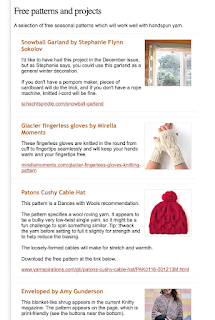
It allows me to paste an image and fill in a few fields when I add stories to a page like the one above, this is a newsletter I manage.

There's a block of code near the top of this page, which generates a feature image. This is the code:
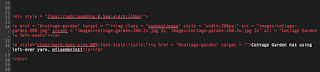
It's an image (with 2x and 3x versions) with a caption, all within a div which is floating right.

Each month for some years I've created the resized images and edited this code manually, because that's less effort than remembering how to set up a new template for a custom card in Dendrite. 

So today I've gone to the trouble, and have also gone to the trouble of documenting it here for you and for myself.

This text only appears once on the page, but the real benefit is being able to use the 'insert card' dialog to paste the image and write the caption.  Turning multiple fiddly copy-and-paste operations into a few slick and mindless strokes.

So here's the procedure. You're welcome, future-me.

Adding a new template to a Dendrite website

First copy one of the existing default templates, found in <website folder>/Templates. (use 'News' because that one uses all of the tokens, which will serve as a temporary reference). Change its name to something memorable (In this case, FeatureImage.txt) 
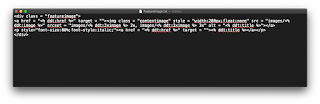
A template file consists of the code for that card, with dendrite-style tokens inserted where information from the card dialog is to appear. The example above should be self-explanatory.

With that in place, Insert Card in Dendrite offers this dialog, which you can use to fill in the information, and Add Image allows you to paste the image (past it once, Dendrite can create the 2x and 3x versions. All you have to do is give it a base name, which also serves as the id for this particular object.)
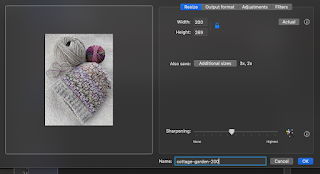
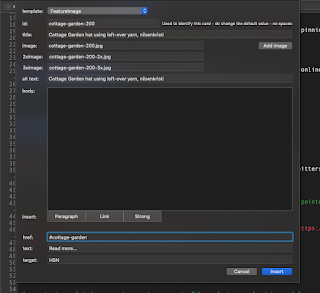
I use a keystroke to grab a roughly-square image to the clipboard. A paste into the image well in the dialog above crops it to the selected proportions and resizes it with 2x and 3x versions. It's a remarkably efficient way to add 'cards' containing images to a hand-coded web page. (Note that in this example, my new template doesn't use the body, the link text or the link target. So those can be ignored when filling in this card.)

Important things to remember

  • Remember to select your new template before OKing this card dialog (the drop-down button at the very top of the Insert Card dialog.) I think it defaults to 'News' rather than the last one you chose. 
  • If you use a different image format (as I do here, 200w and locked proportions rather than 150x150 for the regular news stories) remember to make sure those settings are right for this special card and future regular ones.


Tuesday, 11 August 2020

Development environment for hand-coding websites - update

Moving from an app built for myself, to a product that I expect other people to use has been a much longer process than I would have imagined. The very long list of small fixes and enhancements makes me realise what I'm prepared to live with and work around.

The first public release happened a little while ago and yesterday it received an update with lots of rough edges smoothed off.

If it turns out that I'm the only person who wants to hand-code html/css/js then that's fine, my own tool is much nicer to use than it has been for most of its life. 

The current version is entirely free. Download is here. No card details, not even an email address. The only thing I do ask for is feedback.

Sunday, 19 July 2020

A sneaky peeky at the current development project

Years ago I wrote a simple development environment to help me hand code small websites. (Please don't judge my code.)


Development environment is overblowing it. But it did one very important trick.

But first, why would anyone want to hand-code a website? (Does anyone else hand-code any more?)

  • Having a server-side website CMS hacked is frustrating
  • Having plain html files on the server makes your site faster
  • If you're a control-freak like me, you want to write your own clean code, rather than allowing a system to generate unnecessary unreadable guff.

The first thing you notice when you hand-code a site, even a small one, is that if you make a change to code that appears on all pages, it's a huge PITA to go through all pages making the same change.

Hence that trick I mentioned. Those blue links in the screenshot are where an 'object' is inserted. An object is stored once, you edit it once and when you 'compile' the site, those placeholders on all pages are expanded. In the same operation, the app uploads the compiled pages to the server by ftp or sftp. Obviously, clicking that blue link in the editor loads the object for editing. The editor has forward and back navigation buttons.

That's a very brief overview. I've been using this myself for years. But as with tools you write for yourself, it's not very well-refined.

I've been thinking that I may not be alone in my wish to manage small sites this way. I guess most people who don't want a server-side CSM will be using a visual website creator on their computer.

I've decided to improve this to the point where it's a credible commercial (initially free) app and see what interest there is.

It's not ready yet. The whole object / compiling / uploading trick works, I've been using that for a long time.  I now have basic syntax colouring working and before any kind of release, I plan to build in these features:

  • A button to trigger 'Tidy', a unix html tidying utility (can also do some validation)
  • Preview of selected page, updated as you type
  • Compress (remove whitespace) before uploading
If you would like to read more, an early draft of the user guide is here.

[Update 8 Aug] A very early version of the application (which I'm not even calling Beta) is now available for download.

Is this of interest to you? Are there other features you'd like in such an app? Let me know.