Showing posts with label scrutiny. Show all posts

Friday, 21 October 2022

Structured Data in Scrutiny Scans

Back in April we launched version 12 of Scrutiny (skipping 11). 

Since then the topic of structured data has been raised by users. 

Scrutiny has long collected Twitter and open graph meta data, and has displayed those fields in its SEO > Meta Data table. But not structured data provided via json-ld. 

It's easy to collect this but not so easy to display it en masse as it has a 'tree' structure.

Here are some first steps. I'm open to discussion on where to go from here. The following is all possible with the current version of Scrutiny, 12.5.0

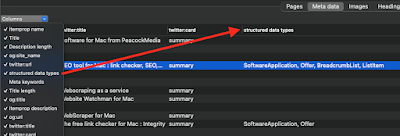
The json-ld is collected from each page and parsed. Perhaps the most important pieces of information are the @types. Like headings there may be multiple, and at different levels, so like headings they can be displayed in the table, in a single column using a separator and in the order that they appear.

The column can be switched on using the Columns selector above the SEO > Meta Data table


That allows you to see at a glance what pages have the structured data and what type(s) are used.

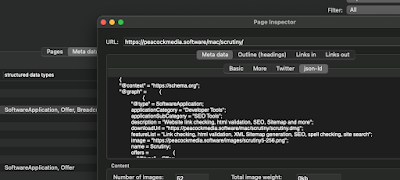
For more detail on a particular page, a double click in this table opens the Page Inspector:


This is the Meta data > json-ld tab of the Page Inspector. Note that we're not seeing the original json string from the page. It has been parsed and formatted. It's the way that a machine would read it, and if Scrutiny can't read the json, then there will be an error message here. (You can see that I've used @graph here in order to display both the software application and the breadcrumb list  within the same chunk of json-ld. If there are multiple chunks of json-ld on the page then they'll be amalgamated here.)

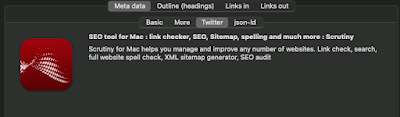
Also in the same inspector is a Twitter Card viewer. This will display information from the Twitter meta data if present, and fall back on Open Graph (og:) fields, as Twitter does. This doesn't look exactly the way that Twitter would display the information - Twitter also draws on info from the Twitter account referenced.


Monday, 25 April 2022

Milestone for Scrutiny - v12

Last year we spent many months rewriting our website crawling engine, the reasons are here. 

Since then, Integrity went through a beta period and eventually Integrity, Integrity Plus and Pro version 12 were released. 

There have been many updates, those apps are becoming mature, the problems found are now increasingly obscure. 

As well as fixing issues with the new Integrity, Scrutiny has been catching up. 

It's now based on Integrity. That approach comes with some compromises (see notes below) but the benefits for all of us are great. 

It also means a totally different interface. Or rather reverting, because up until version 4 Scrutiny had the open, tabbed Integrity-like interface. The move away from that wasn't popular and Scrutiny's UI has been its weak point. 


Notes: (also in the release notes within the .dmg)

There will be no autosaved data for a site until you've run a scan. Your previous scans will only be visible in the previous version. V12 requires new scans before autosaved data is available. This is due to the format of some of the data changing a little, 

V12 isn't document-based. This is part of consolidating Scrutiny & Integrity. Being document-based requires a different architecture within the app, introduces the need for all sorts of complexity and workarounds. The compromise is that it's no longer possible to run multiple scans at the same time. Until there's a 'queueing' system built into Scrutiny 12, you'll need to make sure that any scheduled scans don't overlap time-wise. 

V12 doesn't have monitoring or orphan check.  I don't think either of these features will be missed, and if there is a call for the monitoring functionality, it should be in a separate app. 

The layout is different. I should say 'reverted' because until version 4, Scrutiny shared the Integrity-style interface, and the move away from that wasn't popular. Scrutiny's UI for managing websites hasn't been very user-friendly and had come in for some criticism. It also made it impossible for Voiceover to work (requires visible tabs).

Automatic ftp of sitemaps is no longer available. Scrutiny saves the xml sitemap, you must transfer it yourself.  ftp and ftp+SSL (ftps) has been fine but sftp (which in my experience is now more common) has been problematic

French localisation is unfortunately no longer available. I'm grateful to French-speaking paying customers and people who have offered to help with the translation. The problem isn't paying for translation, but the fact that any new feature or change to the interface (which are happening all the time) requires an interaction with the translator and I prefer a much more agile process. The apps haven't been noticeably more popular in French-speaking countries than without the localisation.


Wednesday, 16 February 2022

In simple terms, the best settings for Integrity and Scrutiny

The default settings for Integrity, Integrity Plus, Integrity Pro and Scrutiny have been tweaked over 15 years. Generally speaking, they will be the best settings and the most likely* to perform a successful, full  and useful scan.

The very short version of this post is: go with the defaults, and only adjust them if you understand and want to use an additional feature, or if you have a problem that may be cured by making a change. Please contact support if you're unsure about anything. 


The rest of this post gives a very basic 'layman' explanation of the site-specific options and settings. 

In version 12 (in beta as I write this) these settings have been rearranged and grouped into a more logical order. They're listed below as they are grouped in version 12.


Options

These are optional features. In general, only enable them (or change the default) if you understand what they mean and are prepared to troubleshoot if the option causes unexpected results.


  • This page only:  Simple - sometimes you may want to scan a single page. If you want to scan an entire site, leave this switched off.
  • Check linked js and css files:  This will drill more deeply into the site. If you're looking for a straightforward link check, leave this off.
  • Check for broken images:  Finding broken images is probably as important as finding broken links, leave this on
  • Check lazyload images/load images:  It's possible that your site uses lazyloading of images. If you know that it does then you may want to enable this. NB there is no standard for lazyloading images. Integrity will try to find the image urls in a couple of likely places, but this option can lead to false positives or duplication. Be prepared for troubleshooting.
  • Check anchors:  An anchor link takes you, not just to a page, but to a specific point on a page. With this option on, Integrity will check that the anchor point exists on the target page. If you know that your site uses this type of link, and you want to test them, enable this option.
  • Flag missing link url:  Sometimes during development, you'll create links with empty targets, or use # as a placeholder. This is a way to find those 'unfinished' links.


Advanced

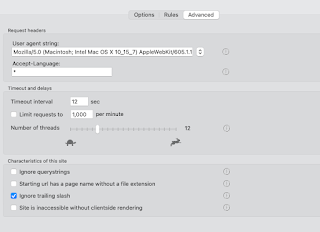
Here we have the controls that may sometimes need to be altered to 'tune' Integrity to your site. In general, the default values should work, only change them if you have a reason.


  • User-agent string:  The default values should work almost all of the time. If the user-agent string is how Integrity identifies itself. If this is set to that of a real browser (which is now the default value) then that should be fine. (Occasionally a site will give different pages for a mobile browser / desktop browser. Or to Googlebot.) 
  • Accept language:  can be used to check specific language pages of a multilingual site.
  • Timeouts and delays:  Use the defaults. If you have problems with timeouts or certain errors then it may be necessary to adjust these settings.


Site characteristics 

Here are a few settings which may need to be adjusted for your particular site. Again, the defaults should be fine, but refer to this guide or ask for help if you have problems.


  • Ignore querystrings: This is the option that is most likely to need changing to suit your particular site. The default is off and that'll probably be fine. However sometimes a session id or other things can be included in the querystring (the part after the ? in a url.) and sometimes these can cause loops or duplications. In that case the setting should be on.  On the flip side, sometimes important information can be included in the querystring, such as a page id, and so for those sites you definitely need the setting to be off.
  • Page urls have no file extension (more recently renamed 'Starting url has page name without file extension'): The explanation of what this box actually does is lengthy and it's more than likely that you don't need it switched on.  In the case where it's required, Integrity should recognise this and ask you an explicit question, and set this box accordingly.
  • Ignore trailing slash: It's very unlikely that this needs to be switched off (default is on). It has become less important in version 12 because its inner workings are slightly different.


If you're using version 10 or earlier, then you'll have the option to Check links on error pages.  I strongly advise leaving this switched off, as it's pretty likely to cause problems or confusion. v12 doesn't have the option. 

If you have a custom error page (which is likely to be one page) and want to test the links on it, then test it separately by setting up a single-page configuration to a non-existent url (such as mysite.com/xyzabc) 


Rules

If you have a specific problem, then you can sometimes cure that with a targeted 'ignore' or 'don't check' rule.  

The other very useful use for rules is to either ignore an entire section of a site, or to limit the crawl to a specific part of a site.


*It may not seem that way if yours is one of the sites that needs a change from default settings, but that's probability for you.  In practice, only the querystring setting is an unpredictable 'it depends' setting. Go with the default, contact support if you need help.

Monday, 31 January 2022

Locate : an overlooked feature in Integrity and Scrutiny

 The Locate feature is an overlooked feature in Integrity and Scrutiny. It answers the common question, "Integrity is reporting a broken link on a page but I don't know where to find that page" or "that page shouldn't exist any more".

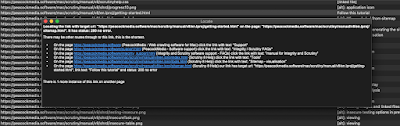
It tells you, as a user, how to find the link in question and the page it's on. These hyperlinks are clickable.


There may be more than one route to click through from the home page (or your starting url) to the link in question, but this tool should show the shortest.

It's important to distinguish here between link urls, and a single instance of a link.

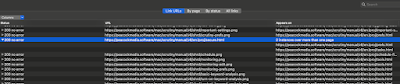
In this example, I've selected a link url which has tested as good. There may be links with that target url on multiple pages (or multiple links on the same page). For example a link to the home page probably exists on every page of a site, maybe in more than one place on a page.


A context menu* triggered by a right-click or control-click on that url row will only show options that are relevant to that url, or the page at that url. In order to access the Locate feature, you need to right-click one of the link instances, which are revealed when you expand the row.

The By page and By status views both show link instances when the page / status is expanded, so Locate can be accessed in those views after expanding a page/status. All Links is a flat table showing link instances, so Locate will appear when you right-click any row. In all of these cases it's important to only select a single row, Locate can't work on multiple selected items.

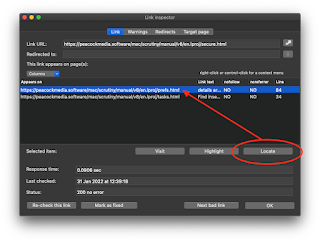
Similarly, if you open the link inspector, it concerns a link url and the status of that url when tested, and it has a table listing the instances or occurrences of that url in links. Before using the Locate button (or context menu in that table) it's important to select one of the instances in the table.


Recent versions of Integrity and Scrutiny may have Locate in these context menus but it may not appear to do anything. This is fixed in Integrity and Scrutiny v10.4.12+


Saturday, 28 August 2021

Problems with Shell UK website show up 'enhancement opportunity' for Scrutiny

 I'm used to seeing a lot of 'image without alt text' warnings. It now seems almost normal, despite the fact that it's a HTML validation error as well as an SEO black mark. It's a quick win, why are we so lax?

In this case there are many other html warnings; missing closing divs, p within h3, closing p with open span. (There are a lot of warnings, just a small section is shown in the screenshot below.)

Multi-headed monster

The SEO results showed up 'missing title' on many important pages. This was hard to believe and indeed it shouldn't be believed - the title tags are present. However (I might call this a bug in Scrutiny) some pages seem to have multiple <head> sections, some even nested! 

This unexpected issue tricks Scrutiny into 'body' mode rather than 'head' mode, and it's likely to miss other meta data and <link> tags. I will see that Scrutiny gets an update so that it handles this situation properly - correctly reports the multiple <head> tags and doesn't miss the titles.

Another important issue is links to insecure http:// pages from secure https:// pages - including an http version of the contact form.

The bad links report is juicy. Some are deceptive; it's not unusual for a redirect to a login page to give a 4xx status, we could find out the reason for that and adjust settings. But there are many links here that really are 404. Again, this is a quick win. 

This all adds up to very poor quality. It surprises me that one of the top brands is putting so little into its website upkeep. (site: https://www.shellenergy.co.uk crawled using Scrutiny 28 Aug 2021).

Friday, 27 August 2021

The future for Integrity and Scrutiny

[update Feb 22 2022]: Integrity, Integrity Plus and Pro v12 are out of beta and available here.

[post originally written August 2021, updated in the mean time.]

It feels that the various flavours of Integrity and Scrutiny have reached a plateau, they do what they do and judging by their popularity, they're doing it well (all comments welcome).

That's not to say that they're dormant. Far from it. You can see from the release notes that they've all received frequent updates. But these now tend to be improvements and updates rather than new features.

The biggest news recently has been the HTML validation, and work on that will continue.

Work has already begun on v11 of Integrity and Scrutiny, and it'll necessarily be a deep rewrite of the engine. Which will of course be called the v12 engine, because who's heard of a v11 engine?!

Futureproofing is needed. Partly to keep up with changes in the MacOS system, partly to revise the internal structure of the data and partly to replace some tired stuff with newer stuff, for example our current 'sitesucker-like' archiving system.  

One feature of Integrity and Scrutiny that has been a bit slack is the archiving. Originally this was simply a dump of the html files during the crawl. It developed a bit, but the archiving and processing in Webarch and Website Watchman have left Integrity and Scrutiny behind, so Integrity and Scrutiny will be brought up to scratch with Webarch-style archiving.

There are long-standing issues that need deeper rewrites in order to fix properly. And parts of the interface that could do with a facelift, particular Scrutiny's website / config management screen.

On the business front, it's more than likely that there will be a price increase, but as usual, no upgrade fee for licence holders of v7 or above. (hint: now is a very good time to buy!)


[Update 28 Nov 2021]

I've just posted a video showing the new Integrity Pro in action.If you use Integrity Pro, this won't *look* tremendously different. The changes are as outlined above; much is under-the-hood, for efficiency or just to keep up-to-date with the changing system and web standards. There are one or two important features missing from the interface in this video.


Friday, 20 August 2021

Many 'soft 404s' found on the KFC website

One way to 'fix' your bad links is to make your server send a 200 code with your custom error page.


Google frowns upon it as "bad practice" and so do I. It makes bad links difficult to find using a link checker. Even if a page says "File not found",  no crawling tool will understand that, will see the 200 and move on.  Maybe this is why the KFC UK website has so many of them.
The way that Integrity and Scrutiny handle this is to look for specified text on the page and in the title. Obviously it can't be pre-filled with all of the possible terms which might appear on anyone's custom error page, so if you know that you use soft 404s on your site, you must give Integrity / Scrutiny  a term that's likely to appear on the error page and that's unlikely to appear anywhere else. Fortunately with this site, WHOOPS!  fits the bill. The switch for the soft 404 search and the list of search terms is in Preferences (above).
And here we see them being reported with the status 'soft 404' in place of the actual (incorrect) 200 status returned by the server.

[update 29 Nov 2021] To be fair to KFC, that long list of bad links is now mostly cleared up, although the soft 404 problem still exists, which isn't going to make it easy to find bad links:


If anyone from KFC reads this, we offer a subscription-based monthly website report and would be very happy to include the 'soft 404' check at no extra charge.  

Thursday, 10 June 2021

First Apple Silicon (ARM / M1) builds of our apps

Late to the party, I know. Being at the cutting edge has never been in our mission statement, and no problems have been reported with our apps running on Big Sur under Rosetta (Good job Apple).


This was the first attempt at building Integrity as a UB (which contains native binaries for ARM and Intel based Macs). Of course it was going to be more efficient but I didn't realise just how much faster this would run as a native app on one of the new machines.

The UB versions of Integrity, Integrity Plus, Integrity Pro and Scrutiny are all available on their home pages. They are still in testing and the previous known-stable versions are there too, but all seems fine so far. 


Friday, 5 February 2021

HTML validation of an entire website

Version 10 of Scrutiny and Integrity Pro contain  built-in html validation. This means that they can make some important checks on every page as they crawl. 

It's enabled by default but can be switched off (with very large sites it can be useful to switch off features that you don't need at the time, for reasons of speed or resources).


Simply scan the site as normal. When it's finished, the task selection screen contains "Warnings: HTML validation and other warnings >"
(NB Integrity Pro differs here, it doesn't have the task selection screen above, but a 'Warnings' tab in its main tabbed view.)

Warnings can be filtered, sorted and exported. If there's a type of warning that you don't need to deal with right now, you can "hide warnings like this" temporarily or until the next scan. (Right-click or ctrl-click for context menus.)


The description of the warning contains a line number and/or url where appropriate / possible.

In addition, links are coloured orange (by default) in the link-check results tables if there are warnings. Traditionally, orange meant a redirection, and it still does, but other warnings now colour that link orange. A double-click opens the link inspector and the warnings tab shows any reason(s) for the orange colouring.  Note that while the link inspector is concerned with the link url, many of these warnings will apply to the target page of the link url.


The full list of potential warnings (to date) is at the end of this post. We're unsure whether this list will ever be as comprehensive as the w3c validator, and unsure whether it should be.  At present it concentrates on many common and important mistakes; the ones that have consequences.

Should you wish to run a single page through the w3c validator,  that option still exists in the context menu of the SEO table (the one table that lists all of your pages.  The sitemap table excludes certain pages for good reasons.)


Full list of possible html validation warnings (so far):

unclosed div, p, form
extra closing div, p, form
extra closing a
p within h1/h2...h6
h1/h2...h6 within p
more than one doctype / body
no doctype / html / body /
no closing body / html
unterminated / nested link tag 
script tag left unclosed
comment left unclosed
end p with open span
block level element XXX cannot be within inline element XXX  (currently limited to div/footer/header/nav/p  within a/script/span  but will be expanded to recognise more elements )
'=' within unquoted src or href url
link url has mismatched or missing end quotes
image without alt text. (This is an accessibility, html validation and SEO issue. The full list of images without alt text can also be found in Scrutiny's SEO results.)
more than one canonical
more than one opening html tag
Badly nested <form> and <div>
Form element can't be nested
hanging comma at end of src list (w3 validator reports this as "empty image-candidate string")
more than one meta description is found in the head

warnings that are not html validation:

Type mismatch: Type attribute in html is xxx/yyy, content-type given in server response is aaa/bbb
The server has returned 429 and asked us to retry after a delay of x seconds
a link contains an anchor which hasn't been found on the target page
The page's canonical url is disallowed by robots.txt
link url is disallowed by robots.txt
The link url is a relative link with too many '../' which technically takes the url above the root domain.
(if 'flag blacklisted' option switched on) The link url is blacklisted by a blacklist / whitelist rule. (default is off)   With this option on, the link is coloured red in the link views, even if warnings are totally disabled.


Tuesday, 22 December 2020

A sneaky peek at what's coming in early 2021

Scrutiny and Integrity have received constant attention and frequent updates (often weekly). 

But they feel like mature applications. They sell well, are well-used, we use them to provide services and yet reported problems are very few.

Requested features / functionality have been few too and we haven't had anything major on the radar for these apps. 

However, if you've followed recent developments you'll know that the 'warnings' functionality has been progressing. 

Traditionally, links are coloured orange if there's a redirection. The redirection itself is certainly not an error and users may or may not be concerned about them. (So warnings about redirections can be switched off.)

For some time, other things have been noted and reported as 'warnings' (and listed separately from the redirections in the link inspector) and people asked for a way to view / export these warnings. Scrutiny has been gaining new ways to view warnings (eg columns in tables, a tab in the link inspector). More recently warnings (again, distinct from redirections) have been presented in their own table.

This in itself is major new functionality. It has happened incrementally in later minor releases of version 9.  Version 10 marks what has so far been more of an evolution.

It can go much further. Way back, Scrutiny had the ability to pass every page that it scanned to the w3 validator. Although it was a little clunky internally, it was a very popular feature, and therefore frustrating when w3.org released the 'nu' validator which didn't have the API that allowed us to use it in the same way as before.

Because of the way that our crawling / parsing  engine works, it's easy to spot and report a few more html validation problems. We're working hard on this now. When the v10 beta is released after the new year, it will be able to report a number of important validation problems. It won't be a full html validator just yet, but the list of problems that it can report will grow through 2021.

The html validation functionality applies to Scrutiny and Integrity Pro only.

Scrutiny version 10 will be a free upgrade from the current version, although the word is that there may be a small price increase for 2021. (hint: if you're thinking about buying, now is a good time.) 

[update 8 Jan 2021] The first public beta of v10 is available for download. Important: It will be a free upgrade. It will ask for a key. If you already have a key it will accept your existing one. Just get in touch if you get a 'too many activations' message, the key just needs resetting.

[update 29 Aug 2021] Version 10 has been through some minor point updates and is stable. The warnings functionality continues to gain new warnings and be improved. 


~ Shiela

Wednesday, 5 August 2020

Checking hyperlinks within a Word document (.docx)

Scrutiny has long been able to check links within pdf documents encountered during a website scan. Scrutiny is a website crawling tool, it wasn't intended that you could point it at a local pdf and ask it to check the hyperlinks within it. But with a tweak, the current version can do this.

The option to check links with in a Word document isn't a frequently-requested feature, but it has arisen a couple of times, and this week I've had a task where the ability to test / examine the hyperlinks within a .docx document would be valuable.


It has been an enjoyable (if sometimes bewildering) curve to learn about the docx format. 

As with the pdf option, (with the option switched on) Scrutiny should now look in Word documents discovered during the scan and report the link url and link text, and test that link. This also works if the document is on the local drive and the hyperlink points to another local document. At present this will only work on the .docx format, not the older .doc format.


As I write this post, (5 August 2020) this feature now exists within the current development version of Scrutiny and is in testing. If you would like to try it, I'd be pleased to let you have a test version for you to try. (Contact me.) It's important to try this on as many different docx files as possible before release. 

(Scrutiny offers a 30-day trial, so you'll still be able to try the feature if you're not a Scrutiny licence holder.)

Monday, 6 April 2020

Checking your browser's bookmarks

I had not considered this until someone recently asked about using Integrity to do the job.


Yes, in principle you can export your bookmarks from Safari or Firefox as a .html file and ask Integrity, Integrity Plus, Pro and Scrutiny to check all of the links it contains.

The only issue is that the free Integrity, and App Store versions of Integrity Plus and Integrity Pro are 'sandboxed', meaning that for security reasons, they generally only have access to local files within their own 'container'. Apple insists on this measure for apps distributed via their App Store.

For this reason, those versions of those apps will not be able to fully crawl a website stored locally (some people like to do this, although there are some advantages if you crawl via a web server, even via the apache server included with MacOS).

However, here we're only talking about parsing a single html file for links, and testing those.

A sandboxed app can access any file that you have chosen via an open or save dialog.

So all you need to do is to use File > Open to choose your bookmarks.html file rather than typing its name or dragging it to the starting url field. (Remember 'check this page only' to ensure that you only check the links on the bookmarks file and the app doesn't try to follow all of them.)
I have bookmarks in Safari going back many years. (nearly 2,000 apparently) There are so many pages there I'd forgotten about and some that clearly no longer exist or have moved.

Friday, 19 July 2019

Migrating to a secure (https://) website using Scrutiny 9

There is a more recent and updated version of this article here.

Yesterday I moved another website to https:// and thought I'd take the opportunity to make an updated version of this article. Scrutiny 9 has just been launched.

Google have long been pushing the move to https. Browsers now display an "insecure" message if your site isn't https://

Once the certificate is installed (which I won't go into) then you must weed out links to your http:// pages and pages that have 'mixed' or 'insecure' content, ie references to images, css, js and other files which are http://.

Scrutiny makes it easy to find these.

1. Find links to http pages and pages with insecure content.

First you have to make sure that you're giving your https:// address as your starting url, and make sure that these two boxes are ticked in your settings,

and these boxes ticked in your Preferences,

After running a scan, Scrutiny will offer to show you these issues. If you started at an https:// url, and you had the above boxes checked, then you'll automatically see this box (if there are any issues).
You'll have to fix-and-rescan until there's nothing reported. (When you make certain fixes, that may reveal new pages to Scrutiny for testing).

2. Fix broken links and images

Once those are fixed, there may be some broken links and broken images to fix too (I was copying stuff onto a new server and chose to only copy what was needed. There are inevitably things that you miss...) Scrutiny will report these and make them easy to find.

3. Submit to Google.

Scrutiny can also generate the xml sitemap for you, listing your new pages (and images and pdf files too if you want).

Apparently Google treats the https:// version of your site as a separate 'property' in its Search Console (was Google Webmaster Tools). So you'll have to add the https:// site as a new property and upload the new sitemap.

[update 15 Jul] I uploaded my sitemap on Jul 13, it was processed on Jul 14.

4. Redirect

As part of the migration process, Google recommends that you then "Redirect your users and search engines to the HTTPS page or resource with server-side 301 HTTP redirects"  (full article here)


Wednesday, 29 May 2019

Press Release - Scrutiny 9 Launched

Scrutiny version 9 is now fully released. It is a free update for v7 or v8 licence holders. There is a small upgrade fee for holders of a v5 / v6 licence. Details here: https://peacockmedia.software/mac/scrutiny/upgrade.html

The major new features are as follows:
  • Improved Link and Page inspectors. New tabs on the link inspector show all of a url's redirects and any warnings that were logged during the scan.

  • Warnings. A variety of things may now be logged during the scan. For example, a redirect chain or certain problems discovered with the html. If there are any such issues, they'll be highlighted in orange in the links views, and the details will be listed on the new Warnings tab of the Link Inspector.
  • Rechecking. This is an important part of your workflow. Check, fix, re-check. You may have 'fixed' a link by removing it from a page, or by editing the target url. In these cases, simply re-checking the url that Scrutiny reported as bad will not help. It's necessary to re-check the page that the link appeared on. Now you can ask Scrutiny to recheck a url, or the page that the url appeared on. And in either case, you can select multiple items before choosing the re-check command.
  • Internal changes. There are some important changes to the internal flow which will eliminate certain false positives.
  • Reporting. The summary of the 'full report' is customisable (in case you're checking a customer's site and want to add your own branding to the report). You now have more choice over which tables you include in csv format with that summary.


A full and detailed run-down of version 9's new features is here:
https://blog.peacockmedia.software/2019/05/scrutiny-version-9-preview-and-run-down.html

More general information about Scrutiny is here:
https://peacockmedia.software/mac/scrutiny/

Thursday, 21 March 2019

Hidden gems: Scrutiny's site search

Yes, you can use Google to search a particular site. But you can't search the entire source, or show pages which *don't* contain something. For example, you may want to search your website for pages that don't have your Google Analytics code.

The usual options that you've set up in your site config apply to the crawl: Blacklisting / whitelisting of pages, link and level limits and lots of other options, including authentication.

Here's where you enter your search term (or search terms - you can search for multiple terms at once, the results will have a column showing which term(s) were found on the page).

There's a 'reverse' button so that you can see pages that *don't* contain your term. Your search term can be a regular expression (Regex) if you want to match a pattern. You can search the source or the visible text.

Method

1. Add your site to Scrutiny if it's not there already and check the basic settings. See https://peacockmedia.software/mac/scrutiny/manual/v9/en.lproj/getting-started.html

2. Instead of 'Scan now', open 'More tasks' and choose 'Search Site'
3. enter your search term (or multiple search terms) and review the other options in the dialog


Note

1. If you're searching the entire source, make sure that your search term matches the way it appears in the source. Today I was confused when I searched for a sentence on Integrity's french page; "Le vérificateur de liens pour vos sites internet". The accented character appears in the source (correctly encoded) as &eacute;  If you search the body text rather than source, any such entities will be 'unencoded' before checking.

2. There's a global setting for what should be included / excluded from the visible text of a page. (Preferences > General > Content.)You may want to ignore the contents of navs and footers, for example. One of these options is 'only look at the contents of paragraph and heading tags'. If this is switched on, then quite a lot is excluded. Visible text may not necessarily be in <p> tags.

The search dialog above now has a friendly warning which informs you if you're searching body text and if you've got some of these exclusions switched on.

The download for Scrutiny is here and includes a free 30-day trial.

Wednesday, 26 September 2018

http requests - they're not all the same

This is the answer to a question that I was asked yesterday. I thought that the discussion was such an interesting one that I'd post the reply publicly here.

A common perception is that a request for a web page is simply a request. Why might a server give different responses to different clients? To be specific, why might Integrity / Scrutiny receive one response when testing a url, yet a browser sees something different? What are the differences?


user-agent string

This is sent with a request to identify "who's asking". Abuses of the user-agent string by servers range from sending a legitimate-looking response to search engine bots and dodgy content to browsers, through to refusing to respond to requests that don't appear to come from browsers. Integrity and Scrutiny are good citizens and by default have their own standards-compliant user-agent string. If it's necessary for testing purposes, this can be changed to that of a browser or even a search engine bot.

header fields

A request contains a bunch of header fields. These are specifically designed to allow a server to tailor its content to the client. There are loads of possible ones and you can invent custom ones, some are mandatory, many optional. By default, Scrutiny includes the ones that the common browsers include, with similar settings.  If your own site requires a particular unusual or custom header field / value to be present, you can add them (in Scrutiny's 'Advanced settings'). 

cookies and javascript

Browsers have these things enabled by default, They're just part of our online lives now (though accessibility standards say that sites should be usable without them) but they're options in Scrutiny and deliberately both off by default. I'm discovering more and more sites which will test for cookies being enabled in the browser (with a handshake-type thing) and refuse to serve if not. There are a few sites which refuse to work properly without javascript being enabled in the browser. This is a terrible practice but it does happen, thankfully rarely. Switch cookies on in Scrutiny if you need to. But always leave the javascript option *off* unless your site does this when you switch js off in your browser:
An image showing a blank web page, message: This site requires Javascript to work


GET and HEAD

There are a couple of other things under Scrutiny's Preferences > Links > Advanced (and Integrity's Preferences > Advanced).   'Use GET for all connections' and 'Load data for all connections'. Both will probably be off by default. 
Screenshot of a couple of Scrutiny's preferences, always use GET and load data for all connections

A  browser will generally use GET when making a request (unless you're sending a form) and it will probably load all of the data that is returned.  For efficiency, a webcrawler can use the HEAD method when testing external links (because it doesn't need the actual content of the page, only the status code). If it does use the GET (for internal connections where it does want the content, or if  you have 'always use GET' switched on) and if if doesn't need the page content, it can cancel a request after getting the status code. This very rarely causes a problem, but I have had one or two cases where a large number of cancelled requests to the same server can cause problems.  

'Use GET for all connections' is unlikely to make any visible difference when scanning a site. Using the HEAD method (which by all standards should work) may not always work. but if a link returns any kind of error after using the HEAD method, Integrity / Scrutiny tests the same url again using GET. 

Other considerations

Outside of the particulars of the http request itself are a couple of things that may also cause different responses to be returned to a webcrawler and a browser. 

One is the frequency of the requests. Integrity and Scrutiny will send many more requests in a given space of time than a browser, probably many at the same time (depending on your settings). This is one of the factors involved in LinkedIn's infamous 999 response code. 

The other is authentication. A frequently-asked question is why a link to social media link returns a response code such as 'forbidden' when the link works fine in a browser. Having cookies switched on (see above) may resolve this but we forget that when we visit social media sites we have logged in at some point in the past and our browser remembers who we are. It may be necessary to be authenticated as a genuine user of a site when viewing a page that may appear 'public'.  Scrutiny and Webscraper allow authentication, the Integrity family doesn't.

I love this subject. Comments and discussion are very welcome.

Tuesday, 24 July 2018

Dark mode and Integrity / Integrity Plus / Integrity Pro / Scrutiny

I have to admit that I really love dark mode. It's very easy on the eye and it jarrs a little when you have to look at a web page with a white background.

(Does anyone know whether it's possible for a website to detect a mac's dark mode setting and display a dark version using an appropriate css? Let me know.)

I did naively expect that the OS would simply draw all windows and controls in the dark colours. But it's up to each developer to build their apps under the new SDK. And carefully check for hard-coded colours and unsuitable images within the app.

We're just about there with Integrity / Integrity Plus / Integrity Pro / Scrutiny  and it's been a pleasure to do.  The 'dark mode enabled' version of all of this family of apps will be 8.1.5 (a minor point release, as there are very few functional changes).


[update 26 July 18 and again 8 Aug 18] Scrutiny 8.1.8 is available and looks great under dark mode. Obviously will only look dark on 10.14 with dark mode selected.

[update 30 July 18 and again 8 Aug 18] Integrity, Integrity Plus and Integrity Pro are also available with dark mode enabled. As above, 10.14 is required to see them in dark mode

Saturday, 14 July 2018

Migration to secure (https://) site

This is an older article. The information in it is still correct but there's a newer article here with new screenshots and revised content.

This has been a big week but peacockmedia.software is now https://

This is a well-overdue move. Google have been offering small carrots for a long time, but at the end of this month, they'll be adding a stick as well. They're switching from informing users when a connection is secure, to warning users if a connection is insecure. Google Chrome is making this move but other browsers are expected to follow suit.

Well-informed web users will know whether they really need a connection to be secure or not, but I suspect that even for those users, when this change really takes hold, the red unlocked padlock will start to become an indicator of an amateur or untrustworthy site.

Once the certificate is installed (which I won't go into) then you must weed out links to your http:// pages and pages that have 'mixed' or 'insecure' content, ie references to images, css, js and other files which are http://.

Scrutiny makes it easy to find these.

1. Find links to http pages and pages with insecure content.

First you have to make sure that you're giving your https:// address as your starting url, and make sure that these two boxes are ticked in your settings,
and these boxes ticked in your Preferences,

After running a scan, Scrutiny will offer to show you these issues,

You'll have to fix-and-rescan until there's nothing reported. (When you make certain fixes, that will reveal new pages to Scrutiny for testing).

2. Fix broken links and images

Once those are fixed, there may be some broken links and broken images to fix too (I was copying stuff onto a new server and chose to only copy what was needed. There are inevitably things that you miss...) Scrutiny will report these and make them easy to find.

3. Submit to Google.

Scrutiny can also generate the xml sitemap for you, listing your new pages (and images and pdf files too if you want).

Apparently Google treats the https:// version of your site as a separate 'property' in its Search Console (was Google Webmaster Tools). So you'll have to add the https:// site as a new property and upload the new sitemap.

[update 15 Jul] I uploaded my sitemap on Jul 13, it was processed on Jul 14.

4. Redirect

As part of the migration process, Google recommends that you then "Redirect your users and search engines to the HTTPS page or resource with server-side 301 HTTP redirects"  (full article here)


Thursday, 21 June 2018

Small but important enhancement to Scrutiny's 'insecure content' reporting

An example came to light this week of a link from an https:// to an insecure page on the same domain that Scrutiny had been missing.

If you're scanning a secure site, Scrutiny can help you migration to a secure site by reporting links to insecure pages, and also pages which use mixed / insecure content (js, css, image files which are http://).

A full article about using Scrutiny to help find mixed / insecure content is here.

In this case, the target of a link was secure, but that link was redirecting to an insecure page. This particular situation had gone unreported in the insecure content table simply because of the order that Scrutiny was doing things.


Scrutiny 8.1.2 contains this and some other fixes / enhancements

Monday, 16 April 2018

Scrutiny version 8 released

Some serious 'under the hood' improvements have been made in Scrutiny version 8. Benefits include more efficient scanning of your website and more data collected.

we've invested a lot of time in something that isn't a killer new feature, but will make things run more smoothly, efficiently and reliably, and give you more information.

There have been a number of requests to add more information about the properties of a link , eg hreflang and more of the 'rel' attributes. HTML5 allows loads of allowable values in the 'rel' and if the one you want doesn't have its own yes/no column in the new apps then you can view the entire rel attribute. You can switch these columns on in any of the link tables as well as the one in the link inspector.

The information displayed in Scrutiny's SEO table will include more data about the pages, notably og: and twitter card meta data which is important to a lot of users.


Redirect information wasn't stored permanently, only the start and end of a redirect chain (the majority are a single step. But if there is more than one redirect, you'll want to know all the in-between details)

It's becoming increasingly necessary to apply some limits on the rate of the requests that Integrity / Scrutiny make.

Your server may keep responding no matter how hard you hit it. That's great; turn up those threads and watch Integrity / Scrutiny go through your site like a dose of salts.

If you do need to limit the scan, you'll no longer have to turn down the threads and use trial and error with the delay field. You'll be able to simply enter a maximum number of requests per minute, while still using multiple threads for efficiency.