Tuesday, 21 June 2022

Clock, temperature and humidity display using Badger2040

 The Badger2040 is a RP2040 with e-ink display. Or possibly an e-ink display with a RP2040 on the back:

It has other goodies like 2Mb of flash ram, some buttons and lots of connectors such as a battery connector, stemma/qwiic socket and breakout pads for various serial connections. And USB-C for programming and serial in/out.


I've added an Adafruit temperature / humitity sensor using the stemma connector. This particular sensor is AHT20. The only negative thing about that for this project is that it has a fixed i2c address, and I would have liked to hook up two, one for indoor and one for outdoor temperature. I'll have to buy another which is a different type and has a different address.

For now my program is reading the data from the one sensor and displaying the temp and humidity. This took me some time because the libraries for this sensor (that I could find) were either circuit python or arduino.  If you want to use either of those things, you only need to write a couple of lines of code. For C (or in this case C++)  I had to write my own code starting with i2c_write_blocking() and i2c_read_blocking() and referring to the AHT20 data sheet and the Arduino library. An annoying bug (on my part) meant that I spent more hours than I should have on that.

With that done it was a breeze to print the stuff to the screen (using the Badger C++ example code). I wrote the clock from scratch using the time.h functions within the Pi Pico C SDK to access and process the hardware timer - get_absolute_time(), to_ms_since_boot() etc.  I've got the up and down buttons adjusting the hours or minutes up or down, with buttons A and B switching between adjusting hours and minutes. 

It looks great. The e-ink display is very easy to read in any light and uses no power, except when updating.  I've got the screen updating every 30s or if you push a button to adjust the time.  Another curious thing about this type of display is that it keeps displaying its contents even with power disconnected. Meaning if you wear it as an actual badge, you don't need to power it once it's displaying what you want!

The battery pack that comes with the Badger is a bit chunky (two AAAs inside). I don't know how long that lasts, but I might use a small lithium battery instead, that can be stowed more easily on the back.

UPDATE

I've now got it running off my first found-free-in-the-street  battery. This is a relatively small one compared to the 500+ mAh ones Big Clive has been finding but it is nice and flat and it has been powering another pico project of mine and showed no signs of flagging. I'll be fascinated to see how long it runs the Badger!

Another improvement I've made today is to make the clock periodically write some details to the flash memory, so that if power is removed, it'll start up displaying the same time as it did when disconnected. That saves a lot of button-pressing after a battery change.

I've been struggling with writing to the flash memory on the Pico and on this device, but today I solved my issue. Basically don't have USB stdio enabled while trying to write to the flash.


Monday, 25 April 2022

Milestone for Scrutiny - v12

Last year we spent many months rewriting our website crawling engine, the reasons are here. 

Since then, Integrity went through a beta period and eventually Integrity, Integrity Plus and Pro version 12 were released. 

There have been many updates, those apps are becoming mature, the problems found are now increasingly obscure. 

As well as fixing issues with the new Integrity, Scrutiny has been catching up. 

It's now based on Integrity. That approach comes with some compromises (see notes below) but the benefits for all of us are great. 

It also means a totally different interface. Or rather reverting, because up until version 4 Scrutiny had the open, tabbed Integrity-like interface. The move away from that wasn't popular and Scrutiny's UI has been its weak point. 


Notes: (also in the release notes within the .dmg)

There will be no autosaved data for a site until you've run a scan. Your previous scans will only be visible in the previous version. V12 requires new scans before autosaved data is available. This is due to the format of some of the data changing a little, 

V12 isn't document-based. This is part of consolidating Scrutiny & Integrity. Being document-based requires a different architecture within the app, introduces the need for all sorts of complexity and workarounds. The compromise is that it's no longer possible to run multiple scans at the same time. Until there's a 'queueing' system built into Scrutiny 12, you'll need to make sure that any scheduled scans don't overlap time-wise. 

V12 doesn't have monitoring or orphan check.  I don't think either of these features will be missed, and if there is a call for the monitoring functionality, it should be in a separate app. 

The layout is different. I should say 'reverted' because until version 4, Scrutiny shared the Integrity-style interface, and the move away from that wasn't popular. Scrutiny's UI for managing websites hasn't been very user-friendly and had come in for some criticism. It also made it impossible for Voiceover to work (requires visible tabs).

Automatic ftp of sitemaps is no longer available. Scrutiny saves the xml sitemap, you must transfer it yourself.  ftp and ftp+SSL (ftps) has been fine but sftp (which in my experience is now more common) has been problematic

French localisation is unfortunately no longer available. I'm grateful to French-speaking paying customers and people who have offered to help with the translation. The problem isn't paying for translation, but the fact that any new feature or change to the interface (which are happening all the time) requires an interaction with the translator and I prefer a much more agile process. The apps haven't been noticeably more popular in French-speaking countries than without the localisation.


Thursday, 21 April 2022

Having got so far with the MIDI SID project, I had this real mess of wires and boards. Then I started to add to the carnage with knobs and a display.  

The problem was that if something stopped working I couldn't be sure whether it was because I'd got something wrong, or had just jogged a connection.

Happily, prototype boards are so cheap that you can order something without worrying about the cost. This isn't even really a prototype yet, not all of the components are on the board. I just wanted the Pico, two SIDs (in this case swinsids) and the MIDI in circuit soldered firmly in place so that I could experiment with knobs, buttons and displays, and develop the software without fear of breaking it by jogging the desk!


To get you up-to-date if you haven't seen my ramblings about this, I'd love a box with MIDI input, SID chips inside, audio out, and simple controls. I'd like to be able to play a .mid file into it, or plug in a keyboard, with options for polyphonic or monophonic output. (I've done some of this using a C64 and MIDI cartridge, but it'll be good to have a standalone box.)  I'd like to try a larger version with enough SIDs to be able to map each midi channel to a voice. Maybe in time I could add the components needed to support real SIDs, but being able to use ARMSIDs would be good as they're a great replacement. (I'm not sure that it's ethical to encourage anyone to use precious real SIDs in something like this.

Quick demo of the thing working (just one channel in, one voice playing). I've got Logic Pro playing a simple tune, with a USB-MIDI converter allowing me to plug that into this board. 

If you're interested in the project, I'm going to use the hashtag #MIDISID on Twitter. 

Sunday, 6 March 2022

Minstrel the 4th is a modern recreation of the Jupiter Ace, a lesser-known home computer from 1982. It's notable for its use of Forth rather than BASIC which was common at the time.

The Ace had a ZX Spectrum-like rubber keyboard. The Minstrel's is an improvement but its small tactile switches don't really allow for fast typing.

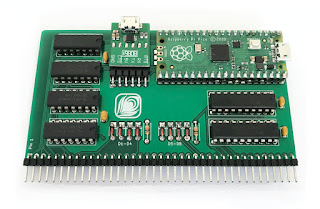
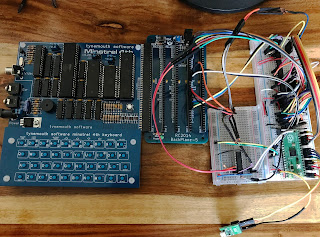
The Minstrel and similar computer scan the keyboard by reading a group of hardware ports which correspond with half-rows of the keyboard. They expose the bus as an expansion port, so it's possible to intercept those port reads. Here's my working prototype, it uses quite a bit of logic. The Pico's main job is to act as a USB host and allow a modern keyboard to be plugged into its own micro-USB port. and maps the keypresses it receives to the appropriate rows and columns of the Minstrel's keyboard matrix.

It's not only the size and arrangement of the keys that limit typing speed, but the fact that the keyboard matrix is scanned every 1/50th second and then not buffered. So even with modern key switches, this makes typing on computers like the Ace, ZX81 and Spectrum is a bit of a plod. It's easy for the Pico to buffer the keyboard input, and present it to the Minstrel one key at a time, at a speed that it can handle.

This also opens up the possibility of connecting a serial terminal to the device to allow listings to be pasted to the Minstrel. It also means that anything you type using a USB keyboard can be echoed to the terminal giving you a paper tape of  In the top picture you can see that the finished product has a USB-FTDI adaptor attached for this purpose.

My interface is now in production in small batches, please contact me for details.

Monday, 28 February 2022

Integrity v12 launched

You may already know that we spent a chunk of last year bringing Integrity's engine up-to-date. You can read the reasons for this in an earlier post:

https://blog.peacockmedia.software/2021/08/the-future-for-integrity-and-scrutiny.html

In the new year, this was released in the form of Integrity Pro 12 beta which was free and unrestricted. Jan and Feb have seen gradual fixes and improvements to that and this week v12 has quietly become the general release (with v10 also available and supported for a while as a safety net).


In case you're not familiar with the range, Integrity is a link checker, it's free and no-frills.

Integrity Plus allows you to manage settings for multiple sites, adds xml sitemap functionality, csv exporting and search box / filter button.

Integrity Pro adds many of Scrutiny's features; a SEO table, HTML validation table and spell-checking.

If you already hold a licence for Plus or Pro then that key will work with version 12, it's free for you. If you'd like to go from Plus to Pro then there's a lose-nothing upgrade, and also from Plus or Pro to Scrutiny.

(Note that if you're moving from v10 Integrity Plus to v12, or from Plus to Pro, this will be useful.)

If you're a blogger or journalist, I've updated the Press Materials to include the new icons.

Scrutiny 12

Scrutiny 12 is very much in progress. As with Integrity, there will be a revision of the pricing, and again, there'll be no fee for existing licence holders (v7 onwards). (Hint: now is a good time to buy or upgrade).

One big question: Scrutiny moved to a very different layout at version 5, which wasn't a popular decision, people liked the more open-plan tabbed layout of Integrity and the classic Scrutiny.  Should we return Scrutiny to that look?  Your opinion on this would be gratefully received.


Tuesday, 22 February 2022

This is a quick help document showing how to transfer website configurations between Integrity Plus, Integrity Pro or Scrutiny.

For legacy reasons*, you may also need to do this if you're moving from the web download of Integrity Plus (non-App Store version) to the new v12 Integrity Plus.

First of all, run the new version to see whether this applies to you. You may see the websites that you set up in your previous version. If you don't, then read on.


This is simply an export / import. 

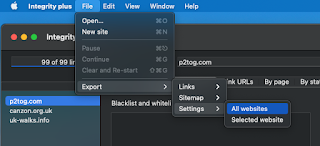
Using version 10 of Integrity Plus, File > Export > Settings > All websites

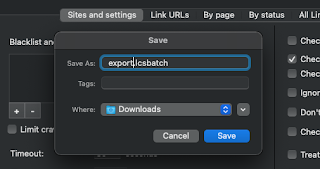
Integrity will save a .lcsbatch file. Choose a location and confirm.
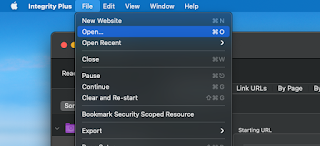
Using the new version 12, File > Open... and choose the file that you just saved.


*Previously, the web downloads of Integrity Plus and Pro were not sandboxed, while the app store versions were sandboxed. Also, the web download and App Store versions of Integrity Plus had different bundle id's (meaning MacOS will see them as different apps). 

Version 12 corrects these inconsistencies, but means that the new Integrity Plus can't 'see' the location where the previous version stored its data, making an automatic import impossible.

Wednesday, 16 February 2022

In simple terms, the best settings for Integrity and Scrutiny

The default settings for Integrity, Integrity Plus, Integrity Pro and Scrutiny have been tweaked over 15 years. Generally speaking, they will be the best settings and the most likely* to perform a successful, full  and useful scan.

The very short version of this post is: go with the defaults, and only adjust them if you understand and want to use an additional feature, or if you have a problem that may be cured by making a change. Please contact support if you're unsure about anything. 


The rest of this post gives a very basic 'layman' explanation of the site-specific options and settings. 

In version 12 (in beta as I write this) these settings have been rearranged and grouped into a more logical order. They're listed below as they are grouped in version 12.


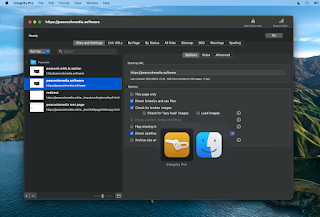
Options

These are optional features. In general, only enable them (or change the default) if you understand what they mean and are prepared to troubleshoot if the option causes unexpected results.


  • This page only:  Simple - sometimes you may want to scan a single page. If you want to scan an entire site, leave this switched off.
  • Check linked js and css files:  This will drill more deeply into the site. If you're looking for a straightforward link check, leave this off.
  • Check for broken images:  Finding broken images is probably as important as finding broken links, leave this on
  • Check lazyload images/load images:  It's possible that your site uses lazyloading of images. If you know that it does then you may want to enable this. NB there is no standard for lazyloading images. Integrity will try to find the image urls in a couple of likely places, but this option can lead to false positives or duplication. Be prepared for troubleshooting.
  • Check anchors:  An anchor link takes you, not just to a page, but to a specific point on a page. With this option on, Integrity will check that the anchor point exists on the target page. If you know that your site uses this type of link, and you want to test them, enable this option.
  • Flag missing link url:  Sometimes during development, you'll create links with empty targets, or use # as a placeholder. This is a way to find those 'unfinished' links.


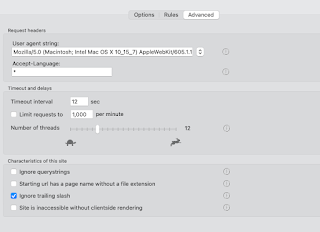
Advanced

Here we have the controls that may sometimes need to be altered to 'tune' Integrity to your site. In general, the default values should work, only change them if you have a reason.


  • User-agent string:  The default values should work almost all of the time. If the user-agent string is how Integrity identifies itself. If this is set to that of a real browser (which is now the default value) then that should be fine. (Occasionally a site will give different pages for a mobile browser / desktop browser. Or to Googlebot.) 
  • Accept language:  can be used to check specific language pages of a multilingual site.
  • Timeouts and delays:  Use the defaults. If you have problems with timeouts or certain errors then it may be necessary to adjust these settings.


Site characteristics 

Here are a few settings which may need to be adjusted for your particular site. Again, the defaults should be fine, but refer to this guide or ask for help if you have problems.


  • Ignore querystrings: This is the option that is most likely to need changing to suit your particular site. The default is off and that'll probably be fine. However sometimes a session id or other things can be included in the querystring (the part after the ? in a url.) and sometimes these can cause loops or duplications. In that case the setting should be on.  On the flip side, sometimes important information can be included in the querystring, such as a page id, and so for those sites you definitely need the setting to be off.
  • Page urls have no file extension (more recently renamed 'Starting url has page name without file extension'): The explanation of what this box actually does is lengthy and it's more than likely that you don't need it switched on.  In the case where it's required, Integrity should recognise this and ask you an explicit question, and set this box accordingly.
  • Ignore trailing slash: It's very unlikely that this needs to be switched off (default is on). It has become less important in version 12 because its inner workings are slightly different.


If you're using version 10 or earlier, then you'll have the option to Check links on error pages.  I strongly advise leaving this switched off, as it's pretty likely to cause problems or confusion. v12 doesn't have the option. 

If you have a custom error page (which is likely to be one page) and want to test the links on it, then test it separately by setting up a single-page configuration to a non-existent url (such as mysite.com/xyzabc) 


Rules

If you have a specific problem, then you can sometimes cure that with a targeted 'ignore' or 'don't check' rule.  

The other very useful use for rules is to either ignore an entire section of a site, or to limit the crawl to a specific part of a site.


*It may not seem that way if yours is one of the sites that needs a change from default settings, but that's probability for you.  In practice, only the querystring setting is an unpredictable 'it depends' setting. Go with the default, contact support if you need help.